 UNVELL
ReoGrid Studio Released — Build Online Spreadsheets in Natural Language, with MCP for AI Agents
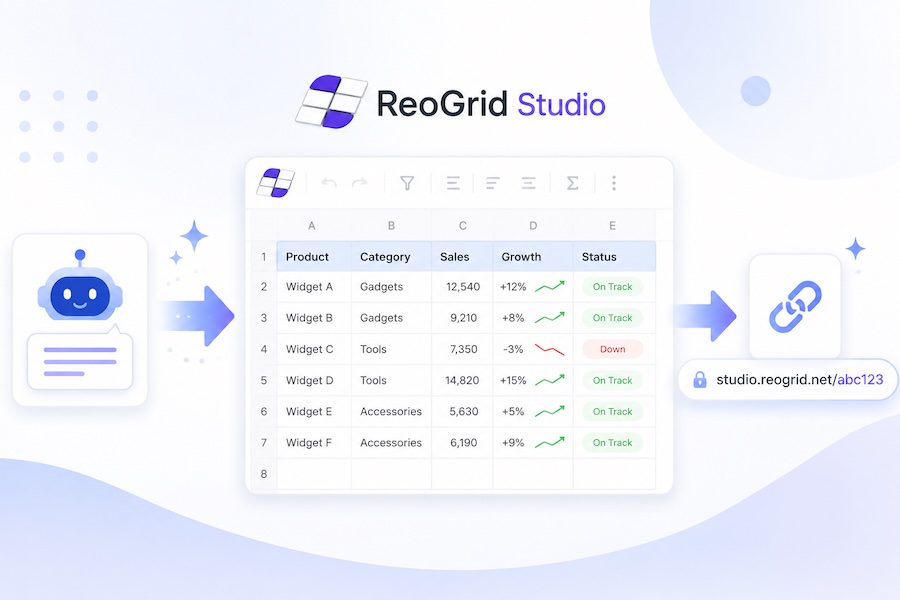
UNVELL Inc. has released ReoGrid Studio (studio.reogrid.net), a browser-hosted online spreadsheet. You can author and edit sheets in plain language — and, most importantly, AI agents can publish their analyzed data as real, navigable spreadsheets through a public MCP endpoint.
Why this exists
Most AI tools today output text. Even after analyzing a spreadsheet — sorting rows, computing totals, building a forecast — the result lands in chat as a markdown table. You have to manually paste it into a real spreadsheet to act on it.
ReoGrid Studio closes that gap. The AI builds a spreadsheet, receives a short URL, and hands it back. The recipient opens the URL and sees a live, navigable spreadsheet — selectable, filterable, copyable, shareable.
Two roles
1. Natural-language authoring
Open studio.reogrid.net, type what you want, and a spreadsheet renders live:
"Make me a Q1 sales summary with three regions, monthly totals, and a SUM column."
The grid updates in real time, and you can iterate via chat. Hit Publish to mint a short URL you can share. This is the on-ramp.
2. AI visualization endpoint
The heart of Studio. Any AI that has analyzed data can publish it as a real spreadsheet and hand the user the URL.
This is plumbed through MCP (Model Context Protocol). An AI client — Claude Code, Claude Desktop, Cursor, or any application built on the Anthropic API — connects to https://api-studio.reogrid.net/studio/mcp and can:
- Read the spreadsheet schema (cells, styles, formulas, filters, frozen panes, etc.)
- Build a
ReoGridJsonDocumentfrom analyzed data - Publish it — and receive a public URL
- Hand the URL to the user
your app  ──► AI analysis  ──► publish_sheet(doc)  ──► { url }
                                                        │
                                                        ▼
                          user opens https://studio.reogrid.net/{shortId}
The AI does the analysis, calls the MCP, gets back a URL, and the URL becomes part of its reply. The user clicks. That is the whole interaction — no SDK to integrate, no infrastructure to host, no data-export pipeline.
What works today
The wire format is the canonical ReoGridJsonDocument from @reogrid/pro — the same JSON that powers ReoGrid Web in the browser. Features Studio supports on day one:
| Category | Examples |
|---|---|
| Core | Cell values, Excel-style formulas, shared styles, merges, borders |
| Layout | Frozen rows/columns, custom row heights / column widths, banded rows |
| Numbers | Custom number formats (currency, date, percentage, scientific) |
| Interaction | Auto-filter on a header range, sort, autofill, range copy/paste |
| Cell types | Checkbox, dropdown, rating (★), progress bar, sparkline, hyperlink, button |
| Conditional | Color scales, data bars, value-based highlighting, top-N |
| Rich | Rich-text runs (mixed bold/italic/color within a cell), outline grouping |
The public viewer is interactive read-only — viewers can select, scroll, copy, sort, filter, and click widgets, but cannot mutate the published data. This is the right shape for a "shared link" view: the recipient can explore freely, take what they need, and trust that what they're seeing is the published snapshot.
Free, no login, rate-limited
ReoGrid Studio is completely free today. No login, no API key, no quota negotiation.
The only gate is a per-IP rate limit of 30 publishes per hour, which keeps the anonymous surface honest. Published sheets persist indefinitely; the short URLs are 14-character flickr-base58 (e.g. 9mkzWpAibo4K34).
A commercial plan with higher quotas and team features is on the roadmap, but concrete pricing and packaging are deliberately Phase 2 work — the bar to entry stays at zero while AI tooling integration scales up.
Using it from Claude Code
Claude Code supports remote MCP servers out of the box. Add the Studio MCP with one command:
claude mcp add --transport http --scope user reogrid-studio https://api-studio.reogrid.net/studio/mcp
Then open Claude Code in any project and ask:
"I have Q1 sales numbers: Tokyo 1200/1450/1600, Osaka 900/1100/1250, Nagoya 700/850/950 across Jan/Feb/Mar. Make a clean spreadsheet with monthly totals and a Q1 total column. Publish it via reogrid-studio."
Claude Code uses the Studio tools autonomously and ends its reply with the public URL. Click it, and you have your spreadsheet. See our setup guide for Claude Desktop, Cursor, and the Anthropic API.
Try it now
- In your browser: open studio.reogrid.net and describe what you want.
- From your AI client: add the MCP config above and ask it to "make a spreadsheet from this data."
- From your application:
POST https://api-studio.reogrid.net/studio/mcp(JSON-RPC 2.0).
Anything an AI can analyze, it can now display as a real spreadsheet for you to act on.
ReoGrid Studio is built on top of ReoGrid Web (@reogrid/pro), the browser-native spreadsheet library. The shared ReoGridJsonDocument format means a sheet published from Studio can be loaded by any @reogrid/pro deployment — and vice versa.
Learn more
More detailed articles are available on the ReoGrid site.